Volume 18 · Social Media · Profit Kit included

LinkedIn Marketing, Step By Step

From “Optimizing Your LinkedIn Profile” to “The Ultimate LinkedIn Personal Branding Checklist”, these 18 checklists take you through LinkedIn Marketing one step at a time, in the order that actually works, rewritten for 2026. Full private label rights, plus a done-for-you Profit Kit to grow your list with them or sell them as your own.

✅ 18 checklists📝 321 steps🎁 Profit Kit included ↓💰 Full PLR ↓
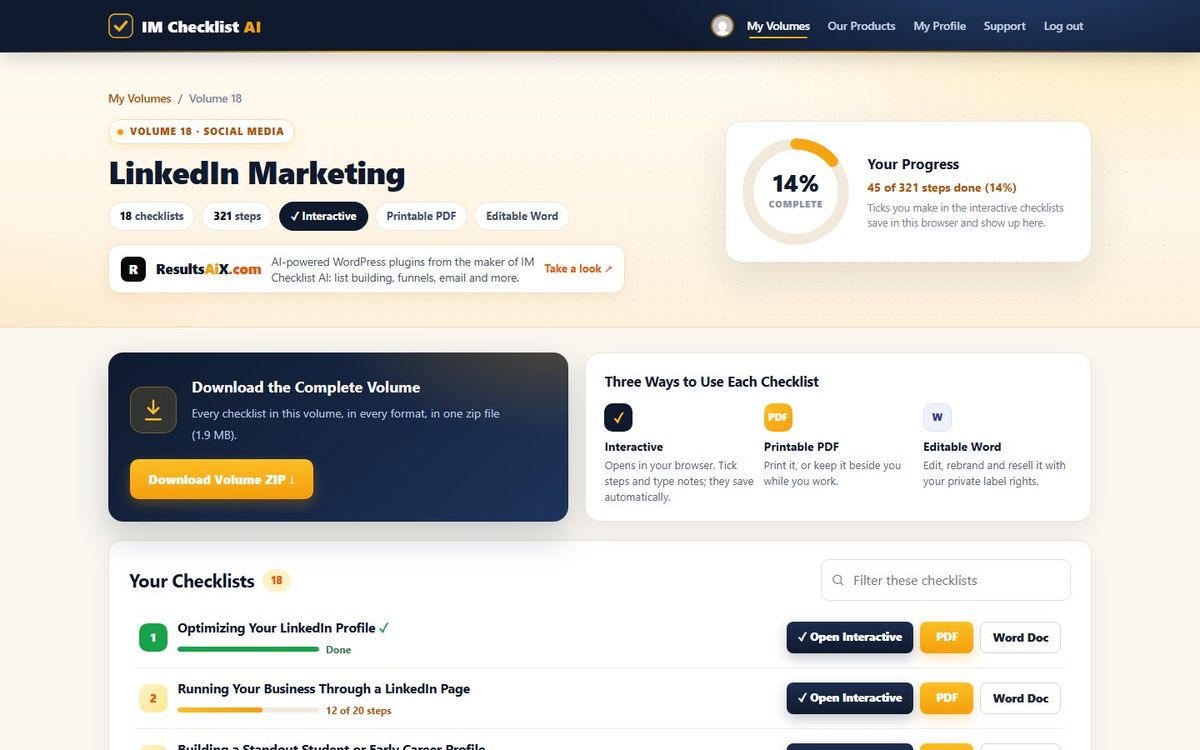
imchecklist.org/members/checklists/volume18
Volume 18, LinkedIn Marketing, inside the IM Checklist AI members area
✅Progress savesTick as you go
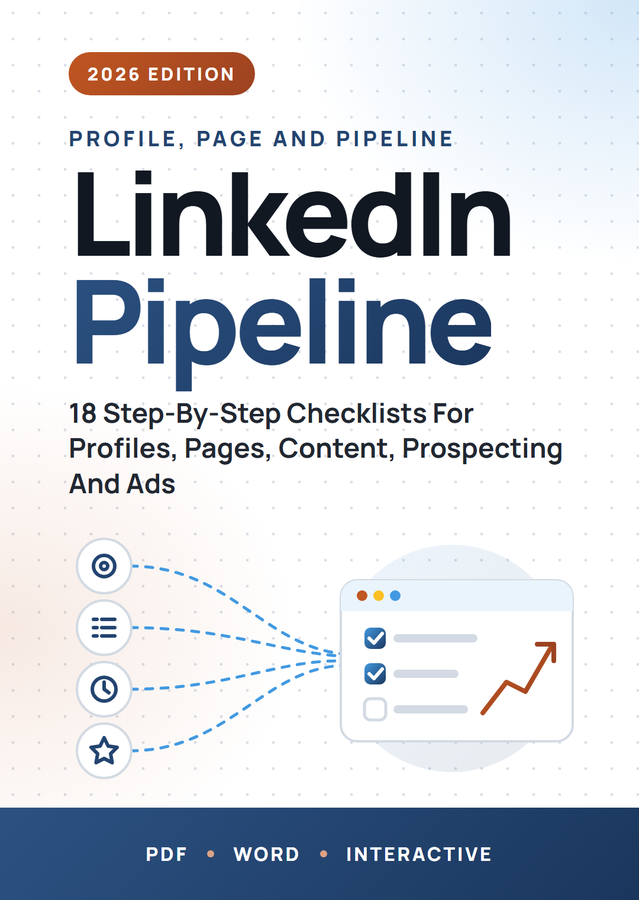
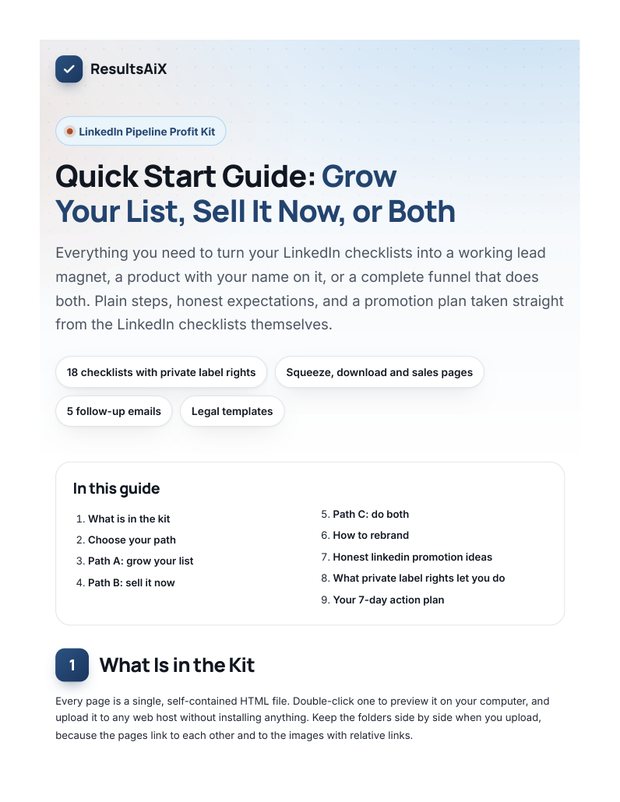
🎁 Included with Volume 18The LinkedIn Pipeline Profit Kit coverThe LinkedIn Pipeline Profit Kit

A squeeze page, download page, sales page, 5 follow-up emails, eCovers and a Quick Start guide, all unbranded and ready for your name.

Get Started →See everything in the kit ↓
86Volumes
1,576Checklists
18In this volume
321Steps in this volume
100%Private label rights
Included with Volume 18

Your Own Product, Ready To Go: The LinkedIn Pipeline Profit Kit

Most private label products hand you files and leave the rest to you. Volume 18 comes with everything around the checklists too: the pages, the emails, the covers and the plan. Put your name on it, upload it, and you can start building your list or taking orders the same day. Every page, email and cover is unbranded and ready for yours.

📥
Squeeze page

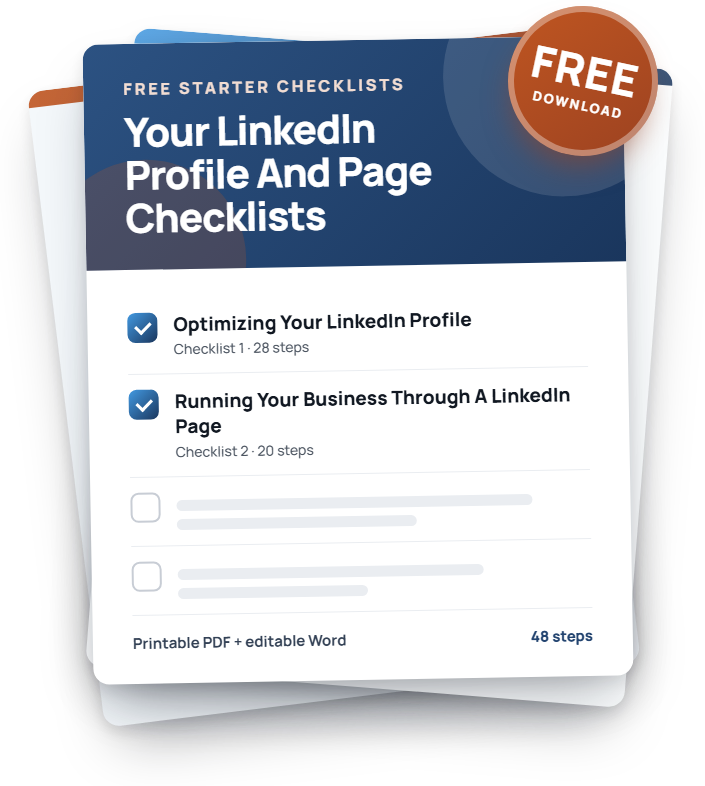
Gives away Checklists 1 and 2 and collects emails with any autoresponder.

🎉
Download page

Delivers the free gift, then offers the full volume.

🛒
Sales page

Sells all 18 checklists as your own product. Add your price and buy link.

✉️
5 follow-up emails

Written, in order, ready to paste into your autoresponder.

📘
3 covers

A 3D cover, a flat cover and a free gift cover, with the source files.

📜
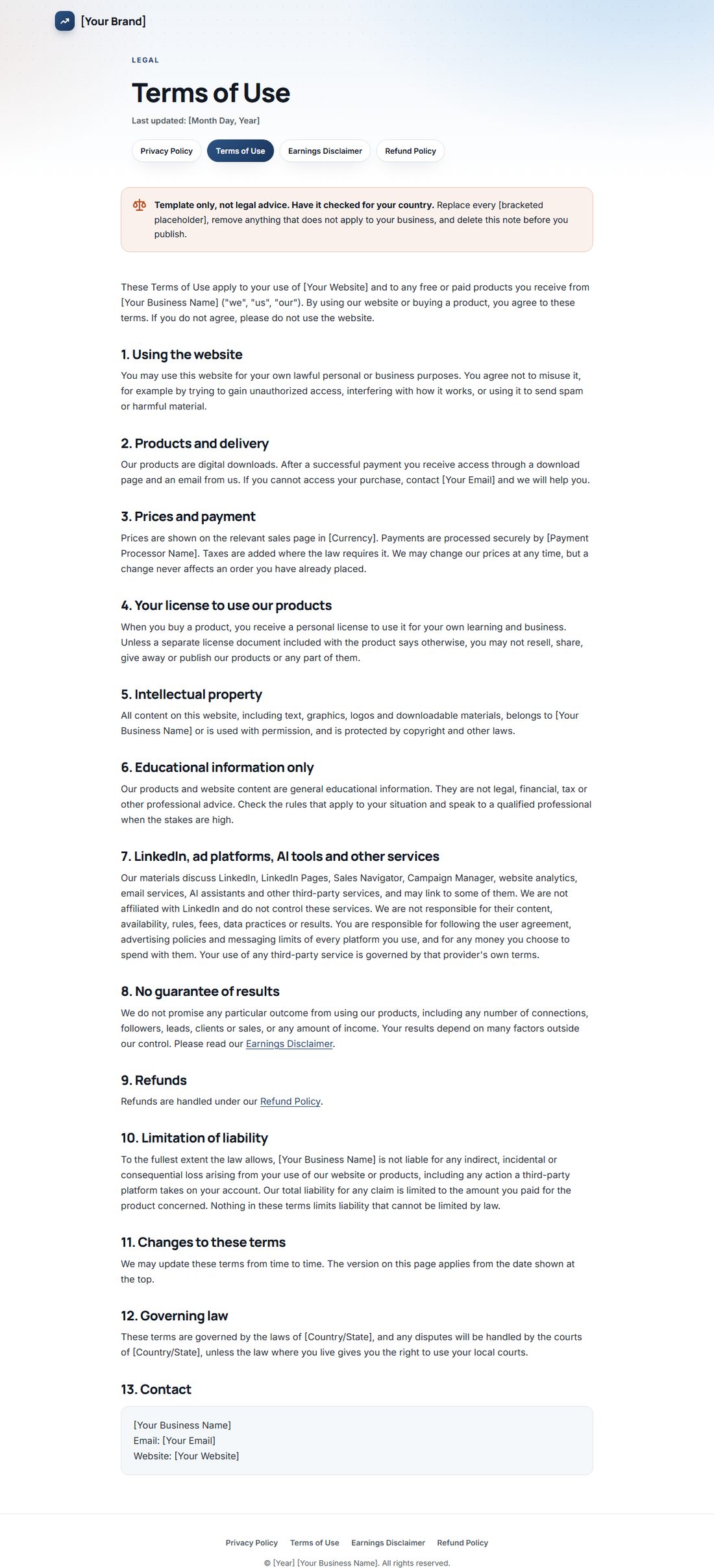
4 legal pages

Privacy, terms, earnings disclaimer and refund policy templates.

🎓
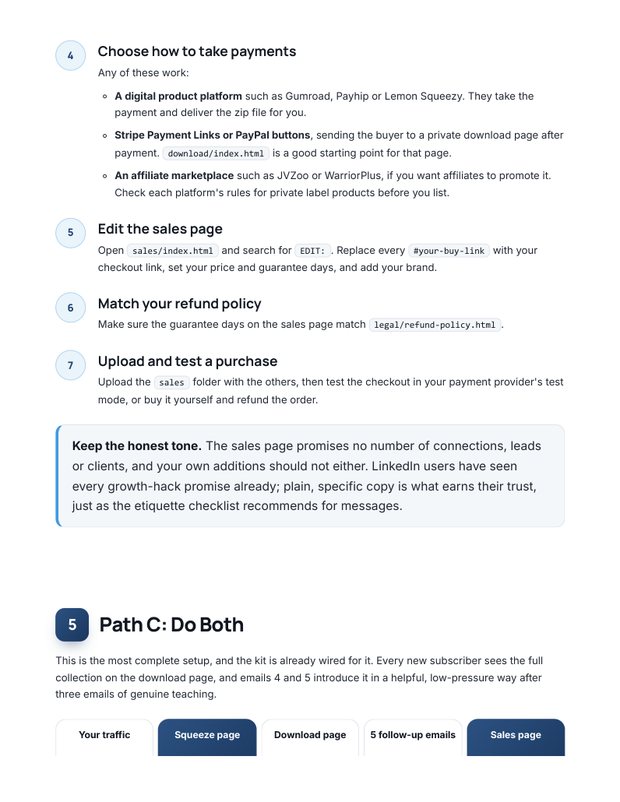
Quick Start guide

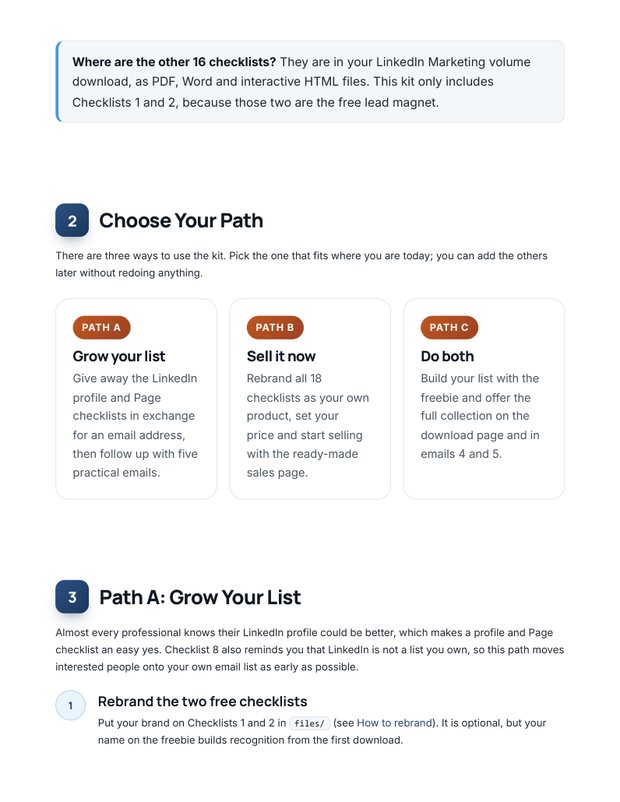
Step by step: what to rebrand, where to upload, honest traffic ideas and a 7-day plan.

📄
Free gift files

Checklists 1 and 2 as PDF and Word, ready for your name.

yourwebsite.com/linkedin-pipeline
The LinkedIn Pipeline Profit Kit mini sales page, ready for your name
The LinkedIn Pipeline Profit Kit squeeze page on a phone
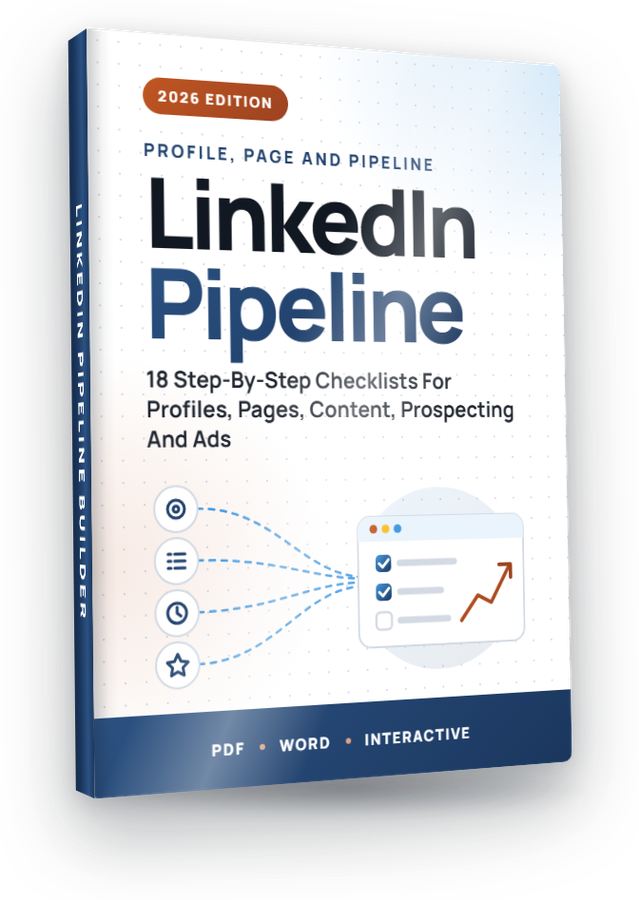
The LinkedIn Pipeline Builder eCover included in the kit
🏷️100% unbrandedYour name, your links
⚡Upload and goPlain HTML pages
A

Grow Your List

Upload the squeeze and download pages, connect your autoresponder and load the 5 emails. New subscribers on autopilot.

B

Sell It Today

Put your name on the checklists, add your buy link to the sales page and keep 100% of every sale.

A+B

Do Both

Give away two checklists, then offer the full volume to everyone who joins. The training shows you how.

Every Page, In Full

Real pages from the kit. Hover any page to scroll it.

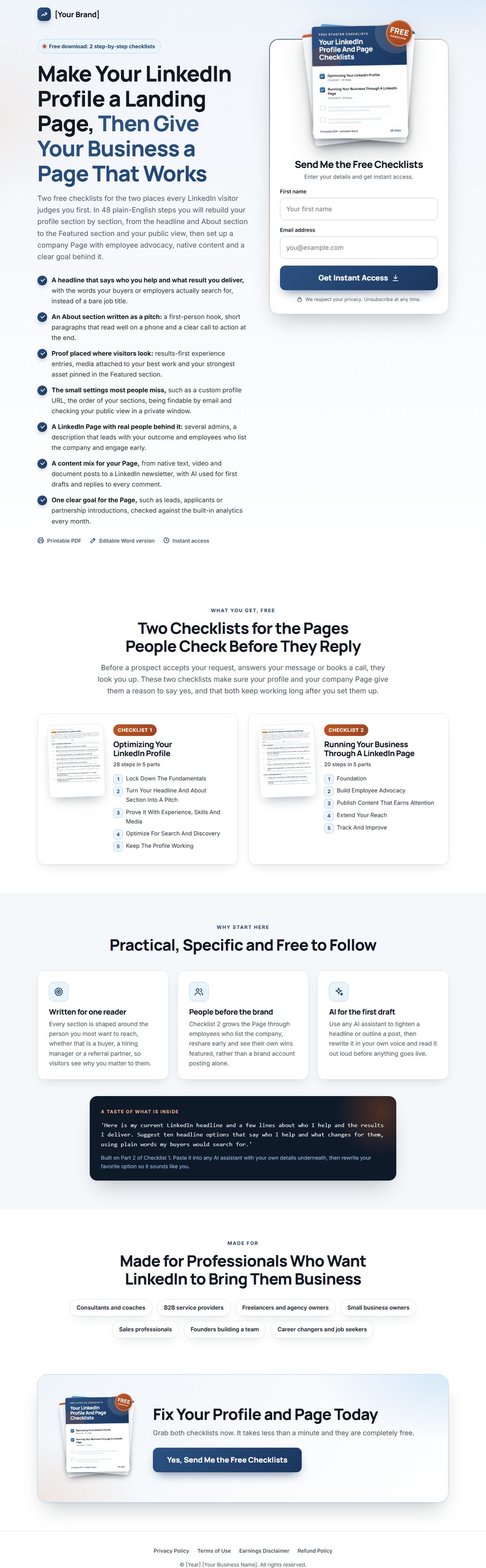
yourwebsite.com/free-checklists
The squeeze page on desktop
The squeeze page on a phone

Build Your List With Two Free Checklists

Checklists 1 and 2 become your free gift. A strong headline, benefit bullets, a 3D cover and an opt-in box that takes any autoresponder's form code.

  • Works with any autoresponder
  • Free gift PDF and Word files included
  • Looks great on every phone
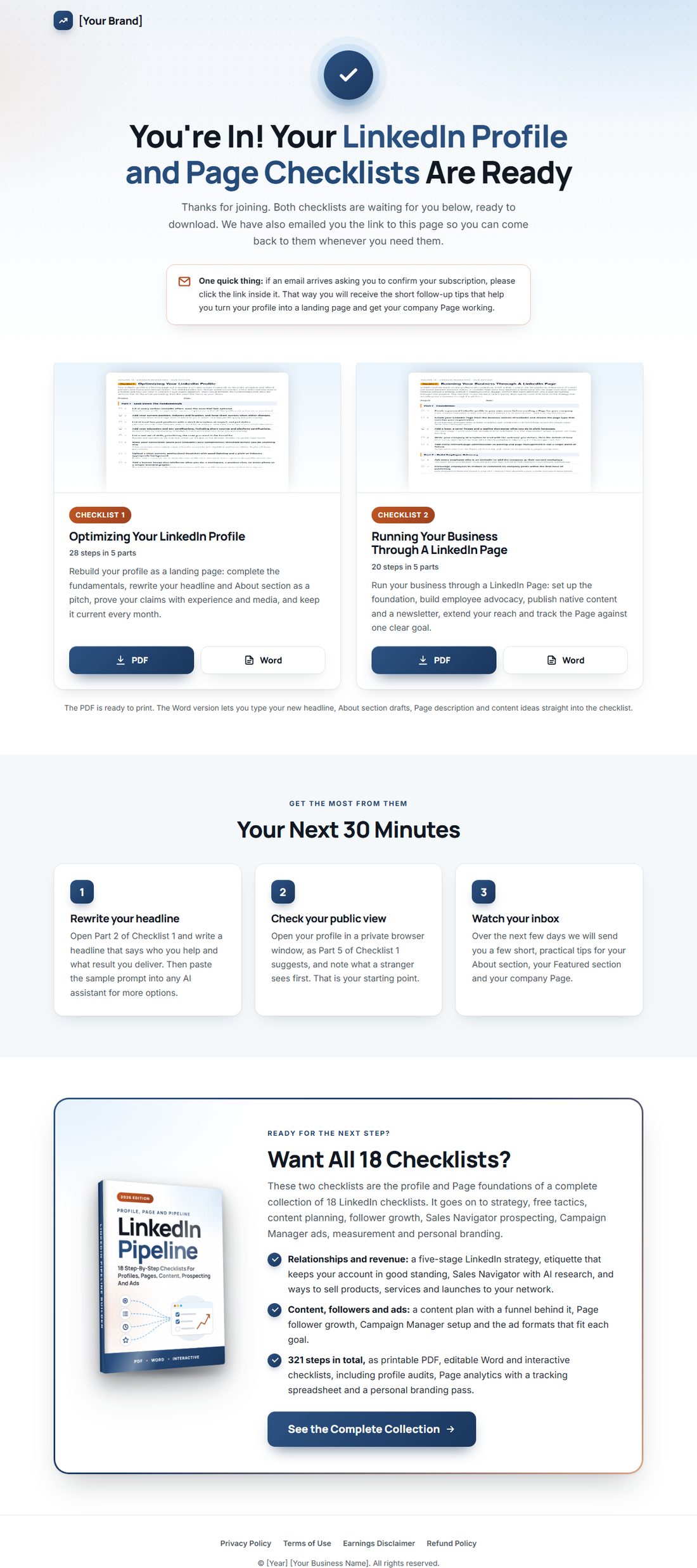
yourwebsite.com/download
The download page on desktop
The download page on a phone

Deliver The Gift, Then Make The Offer

New subscribers land here, download both checklists in PDF or Word, and see a friendly offer for the full volume. Your first sale can happen on your thank-you page.

  • One-click PDF and Word downloads
  • Built-in offer for the full 18 checklists
  • Confirm-your-email reminder included
yourwebsite.com/linkedin-pipeline
The mini sales page on desktop
The mini sales page on a phone

Sell All 18 Checklists As Your Own Product

A complete sales page: headline, problem, every checklist with its real step count, formats, FAQ and guarantee. Add your buy link and price and you are open for business.

  • Every checklist listed with real details
  • Buy buttons ready for your payment link
  • Keep 100% of every sale

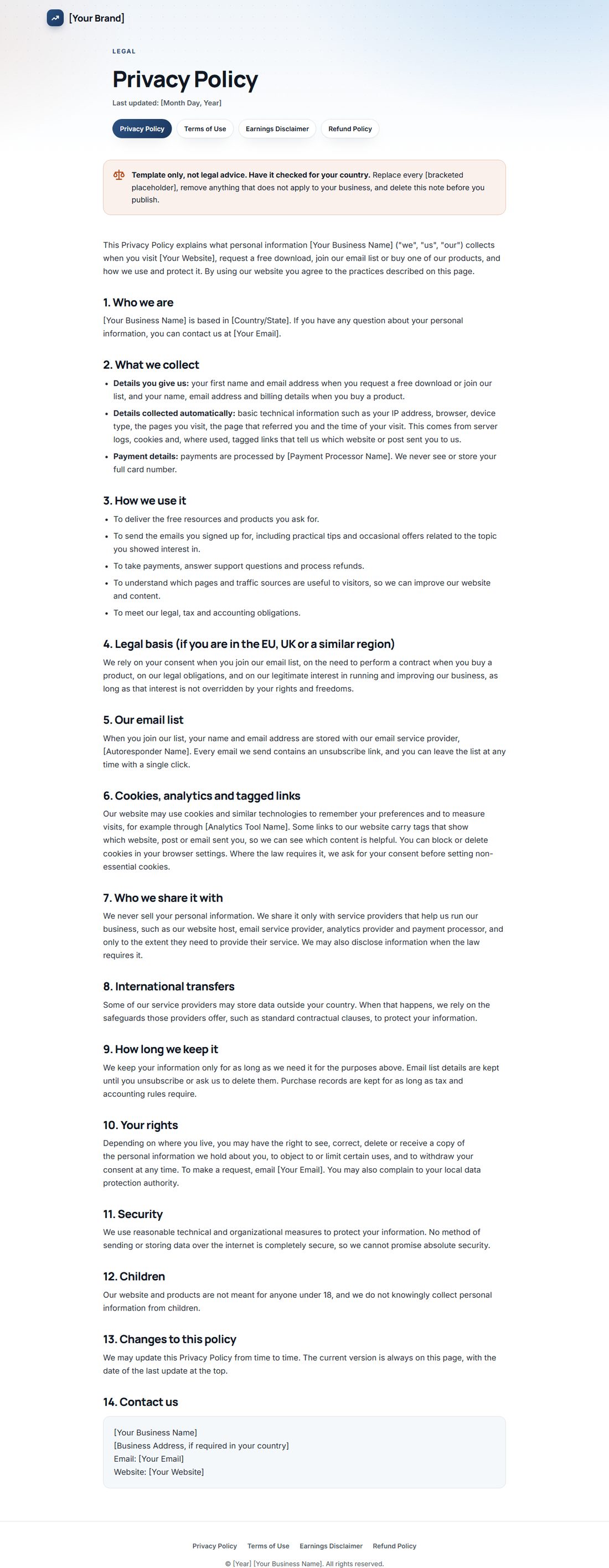
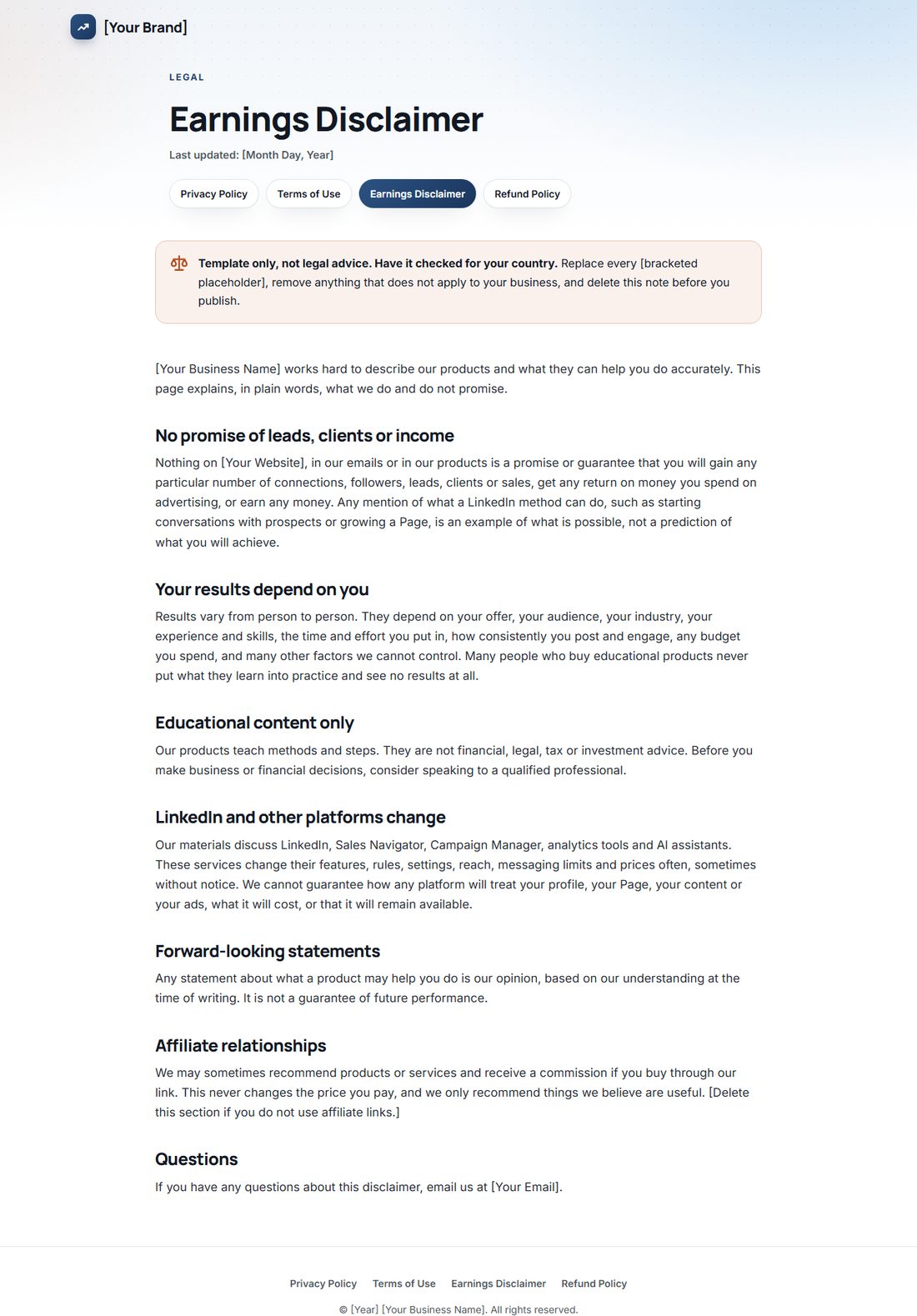
Four Legal Page Templates

Privacy, terms, earnings disclaimer and refund policy, already linked from every page footer. Fill in your details, have them checked for your country, and you look like a real business from day one.

3D eCoverFlat eCoverFree gift cover

Product And Free Gift Covers

A 3D cover, a flat cover and a free gift cover, plus the source files so you can change the title or colors in minutes.

Inbox · your new subscriber
Your LinkedIn profile and Page checklists are hereStart with the one line every visitor reads first
Right away
Your LinkedIn About section is a pitch, not a resumeA hook, short lines, proof and one clear next step
Day 1
Why your company Page needs your team more than your logoThe first hour after a post, and who should be there
Day 2
What comes after your profile and your PageStrategy, content, prospecting, ads and measurement, in order
Day 3
Quick question: what do you want LinkedIn to do for you?One written goal changes how you post, connect and measure
Day 5
Your LinkedIn profile and Page checklists are hereFrom: [Your Name]

Hi [First Name],

Thanks for grabbing the LinkedIn profile and Page checklists. Here is your download page, in case you need it again:

[Link To Your Download Page]

You will find two checklists there, each as a printable PDF and an editable Word file. Checklist 1 turns your profile into a landing page that gets found and trusted. Checklist 2 helps you run your business through a LinkedIn Page, with real people and a clear goal behind it.

If you only have ten minutes today, start with your headline. It is the line people see next to your name in search results, in comments and in every connection request you send.

Most headlines are a job title, and a job title tells a stranger nothing about why they should click. Rewrite yours so it says who you help and what changes for them. Then check it contains the plain words your buyers or employers would actually type into LinkedIn search.

While you are on your profile, look at your banner. If it is still the default background LinkedIn gave you, swap it for something that shows what you do: your workspace, your product, an event photo or a simple branded graphic.

Both jobs sit in Parts 1 and 2 of Checklist 1, so you will already be ahead when you open it.

Over the next few days I will send you a few short emails with the most useful ideas from the checklists, so the people who look you up find a good reason to reply.

Talk soon,
[Your Name]
[Your Brand]

P.S. Ask any AI assistant for ten headline options based on who you help and the results you deliver. Then pick one and rewrite it until it sounds like you.
A Ready-To-Load Email Sequence

5 helpful emails that teach first and lead naturally to the full volume. Paste them into any autoresponder and swap the highlighted placeholders.

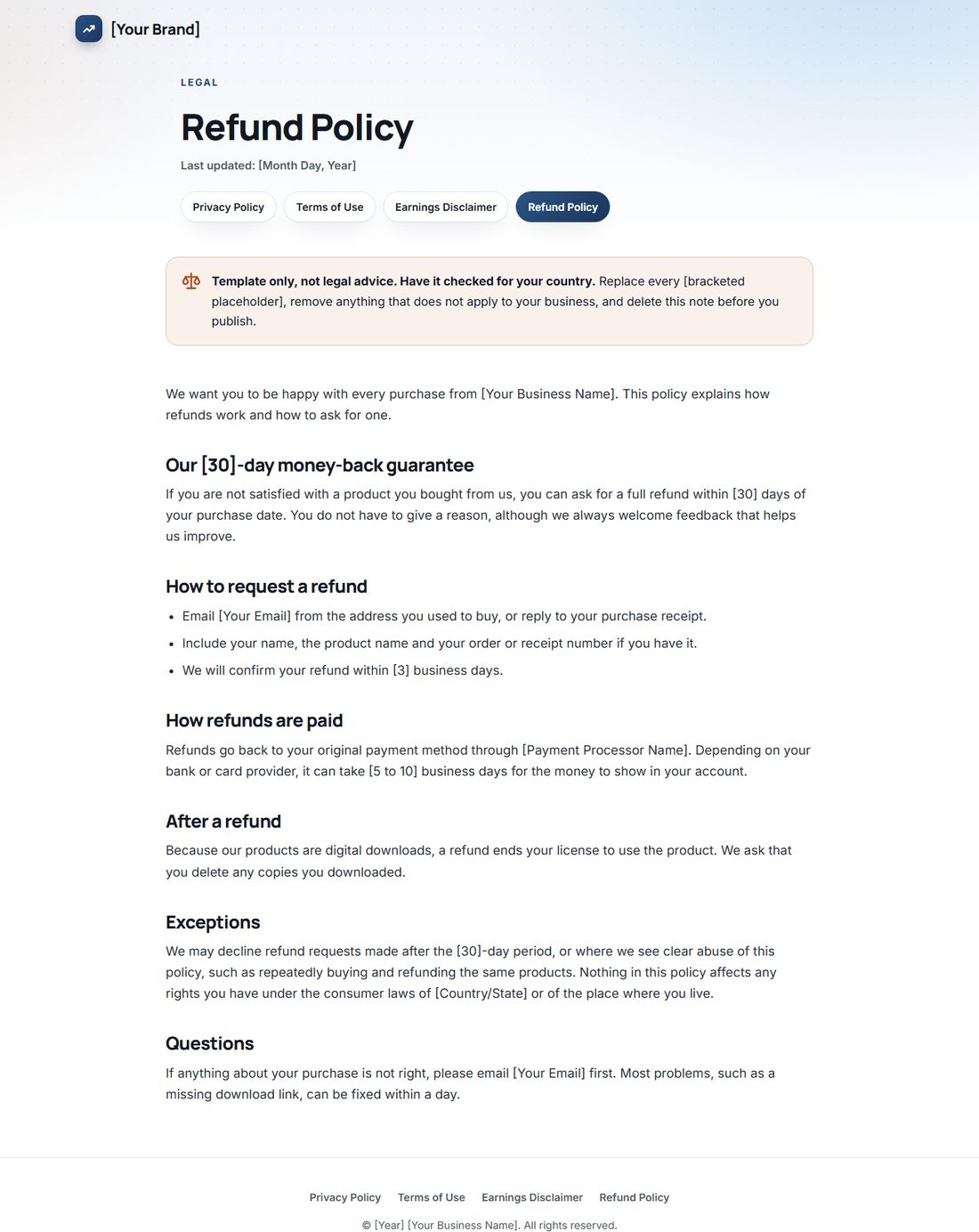
Quick Start Guide inside pageQuick Start Guide cover pageQuick Start Guide action plan page

The Quick Start Guide

Grow your list, sell it now, or both: the guide walks you through each path, shows you what to rebrand, gives you honest traffic ideas and a simple 7-day action plan. Includes optional tool suggestions for faster results.

Try The First Checklist Right Here

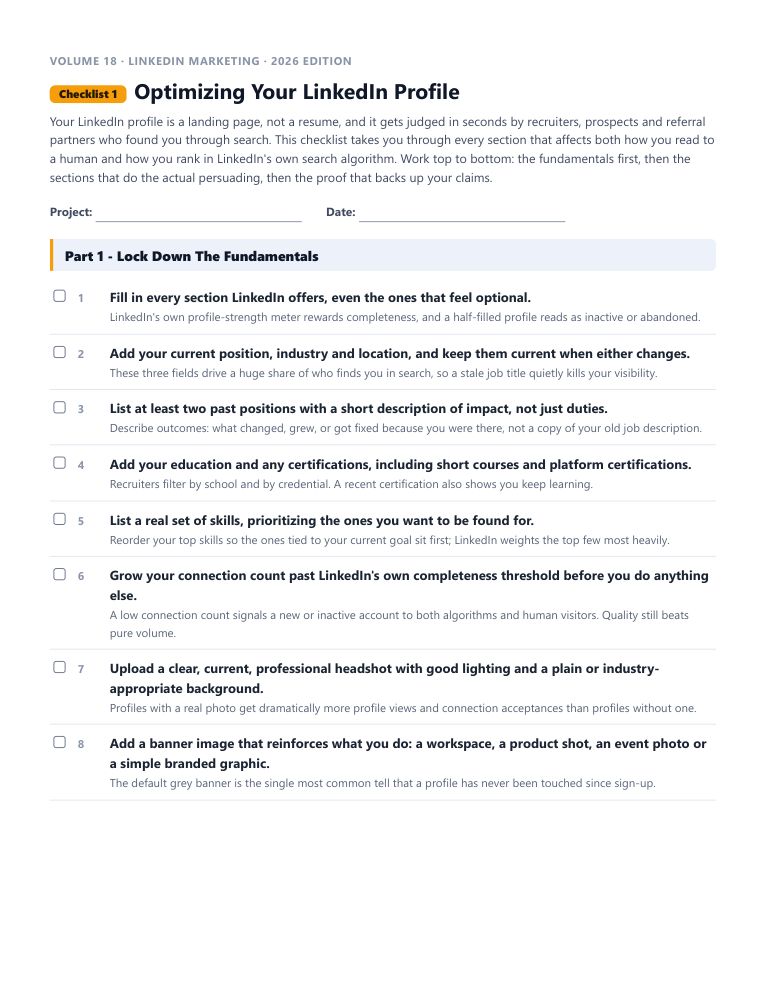
This is the real start of “Optimizing Your LinkedIn Profile”, word for word. Tick the boxes and watch the progress bar move.

Every checklist works the same way: a short brief, the steps in the order that actually works, a practical tip under every step, and pro tips at the end.

18 checklists in this volume. 1,576 in the library. No forty-minute videos to decode.

Checklist 1Optimizing Your LinkedIn ProfileVolume 18 · LinkedIn Marketing
0 of 5 done
Part 1 - Lock Down The Fundamentals
🎉 Part 1 done. That is how every checklist works.
What’s inside Volume 18

All 18 LinkedIn Marketing Checklists

Each one is a complete, follow-along process. Open it, work through it, tick it off. Every checklist comes as an interactive checklist, a printable PDF and an editable Word document.

1

Optimizing Your LinkedIn Profile

Your LinkedIn profile is a landing page, not a resume, and it gets judged in seconds by recruiters, prospects and referral partners who found you through search.

28 steps · PDF · Word · Interactive
2

Running Your Business Through A LinkedIn Page

LinkedIn built its reach on real professional connections, which makes it one of the few platforms where word of mouth still travels between decision makers.

20 steps · PDF · Word · Interactive
3

Building A Standout Student Or Early Career Profile

Students and early career job seekers compete for attention against candidates with years of experience, which means the profile has to work harder to earn a second look.

19 steps · PDF · Word · Interactive
4

Creating And Launching A LinkedIn Page

A LinkedIn Page is free, fast to set up and one of the highest-trust places a B2B business can put its brand, but a rushed setup leaves gaps that hurt search visibility and credibility for months.

18 steps · PDF · Word · Interactive
5

Building A LinkedIn Marketing Strategy

Most people create a LinkedIn profile or Page and then post whenever they remember to, which produces scattered results at best. A real strategy starts with a goal, works through a deliberate sequence of finding, connecting with and engaging the right people, and ends with a way to measure whether any of it moved the business forward.

18 steps · PDF · Word · Interactive
6

Advertising On LinkedIn With Campaign Manager

LinkedIn Ads reach a professional, high-intent audience that most other platforms cannot match, which is exactly why the cost per click runs higher than social platforms built for casual browsing.

18 steps · PDF · Word · Interactive
7

Free LinkedIn Marketing Tactics

You do not need an ad budget to get real results on LinkedIn. The organic feed still rewards consistent, native content and genuine engagement more generously than most other major platforms.

17 steps · PDF · Word · Interactive
8

Monetizing Your LinkedIn Presence

LinkedIn's audience skews toward people with buying power and business problems worth solving, which makes it a genuinely profitable channel once you move past posting for likes.

17 steps · PDF · Word · Interactive
9

Building An Affiliate Or Referral Business On LinkedIn

LinkedIn is easy to dismiss as a platform only for job hunters and recruiters, but the same professional trust that makes it good for hiring makes it excellent ground for affiliate and referral businesses, especially in B2B niches.

19 steps · PDF · Word · Interactive
10

LinkedIn Etiquette: The Dos And Don'ts

LinkedIn is a professional network first, and behavior that feels normal on other social platforms can quietly damage your reputation or get your account restricted here.

15 steps · PDF · Word · Interactive
11

Using Sales Navigator And AI Tools To Boost LinkedIn Sales

LinkedIn's native search is fine for casual browsing, but serious sales prospecting needs the deeper filters, saved lists and lead tracking that only a dedicated sales tool provides.

16 steps · PDF · Word · Interactive
12

Building A LinkedIn Content Marketing Plan

Random posting produces random results, while a real content plan turns LinkedIn into a predictable pipeline of attention, leads and relationships.

18 steps · PDF · Word · Interactive
13

Growing Your LinkedIn Page Followers

Creating a LinkedIn Page is the easy part. Getting a meaningful number of the right people to actually follow it is where most businesses stall, and it rarely happens by accident.

16 steps · PDF · Word · Interactive
14

Creating LinkedIn Ad Formats That Convert

LinkedIn now offers a wide enough range of ad formats that picking the wrong one for your goal is one of the most common ways to waste budget.

17 steps · PDF · Word · Interactive
15

The Complete LinkedIn Profile Checklist

LinkedIn keeps evolving, which means a profile that was solid a couple of years ago can quietly have gaps today. This checklist is a review pass rather than a build-from-scratch guide: run down it against your current profile, section by section, and fix whatever has slipped.

16 steps · PDF · Word · Interactive
16

The Modern LinkedIn Profile Audit

Every year LinkedIn quietly adds fields, changes defaults and shifts what its search algorithm rewards, which means a profile that was optimized a few years ago has probably drifted out of date without you noticing.

15 steps · PDF · Word · Interactive
17

Measuring LinkedIn Page Performance

Posting consistently means little if you never look at whether any of it is working. LinkedIn's built-in Page analytics, paired with your website's own analytics platform, give you everything needed to see what content resonates, who your audience actually is, and how much real traffic and business the Page is driving.

15 steps · PDF · Word · Interactive
18

The Ultimate LinkedIn Personal Branding Checklist

Your LinkedIn profile is increasingly the first thing a hiring manager, client or new contact looks at, often before they ever speak with you directly.

19 steps · PDF · Word · Interactive
Real screenshots, no mockups

Introducing IM Checklist AI: Your Complete Marketing Operating System

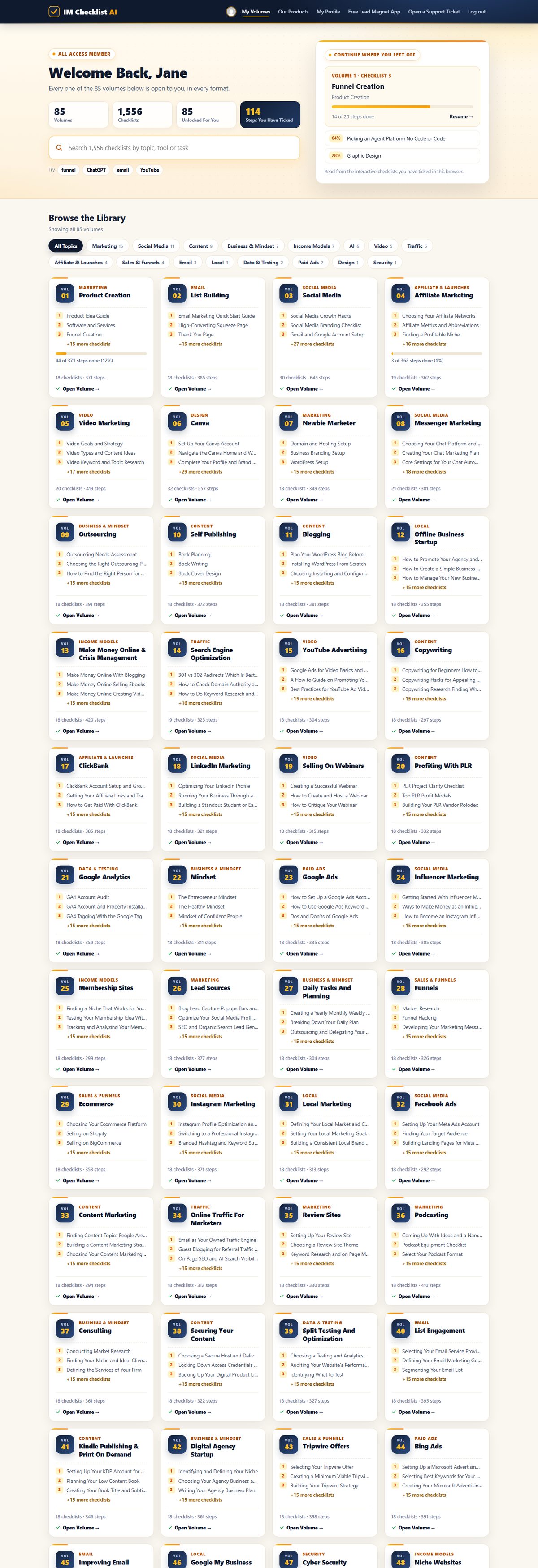
1,576 checklists. 86 volumes. Fully rebuilt for 2026. This is the brand new members area, exactly as you'll see it. Hover any screen to scroll it.

Every volume, one search box. All 86 volumes in one place. Search all 1,576 checklists by topic, tool or task, and pick up exactly where you left off.

imchecklist.org/members
The members dashboard with every volume

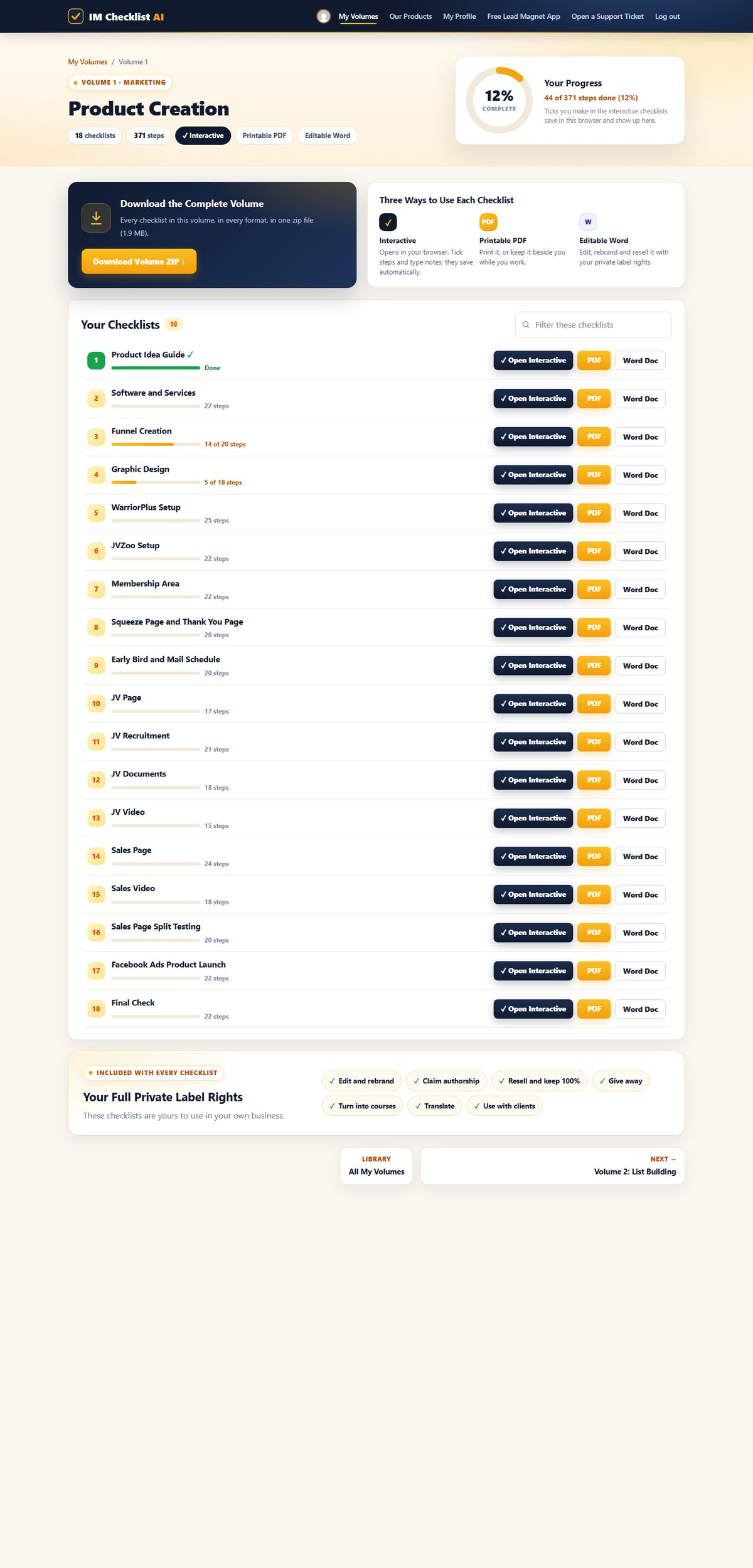
Your progress on every checklist. Each volume shows every checklist with your progress, the interactive, PDF and Word versions side by side, and the whole volume as one zip download.

imchecklist.org/members/checklists/volume1
Volume 1 in the members area

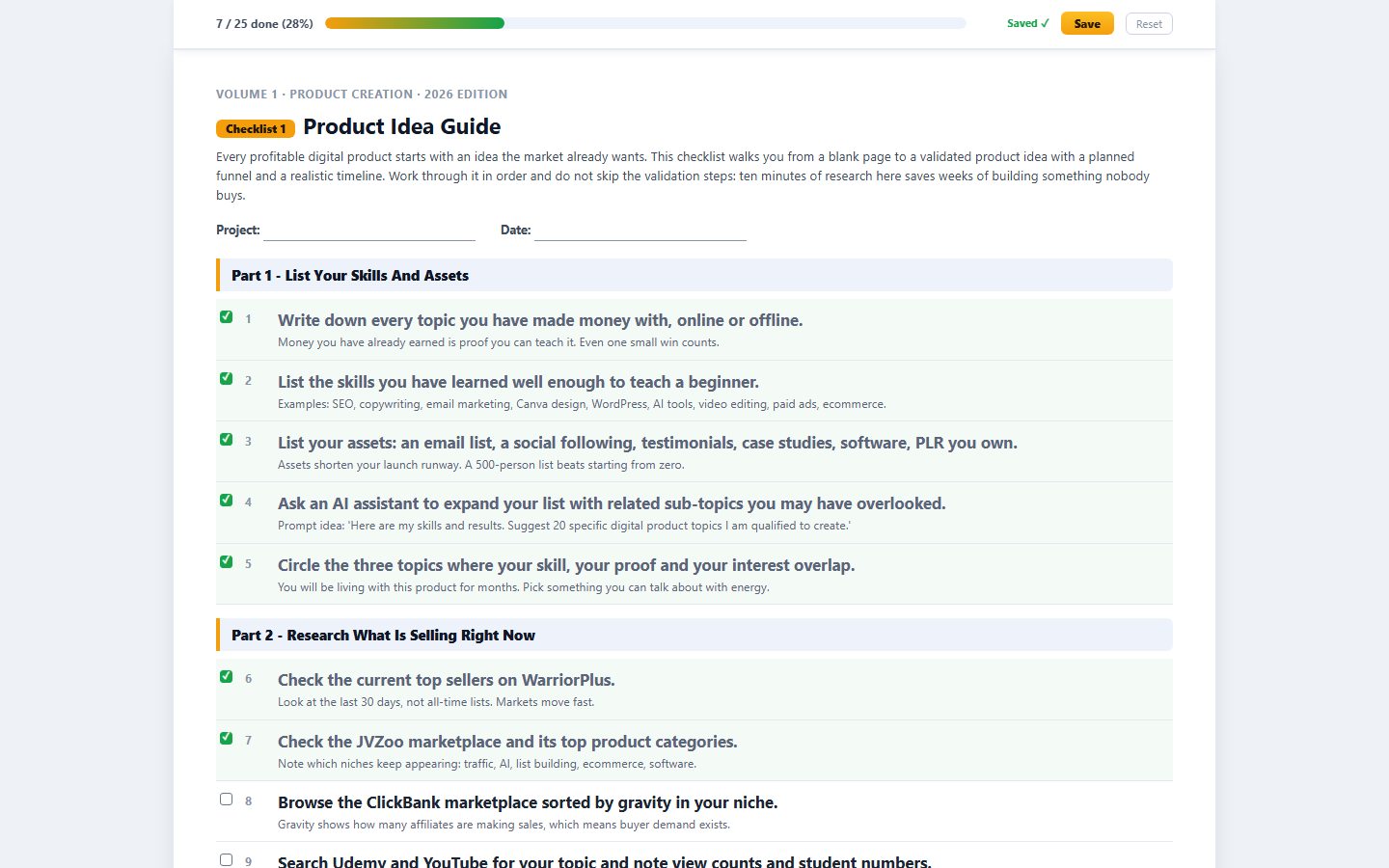
Tick it off, it saves itself. Open any checklist in your browser, tick each step and type notes as you go. The progress bar fills up and your place is saved for next time.

imchecklist.org/members/checklists/volume1/product-idea-guide
An interactive checklist with steps ticked

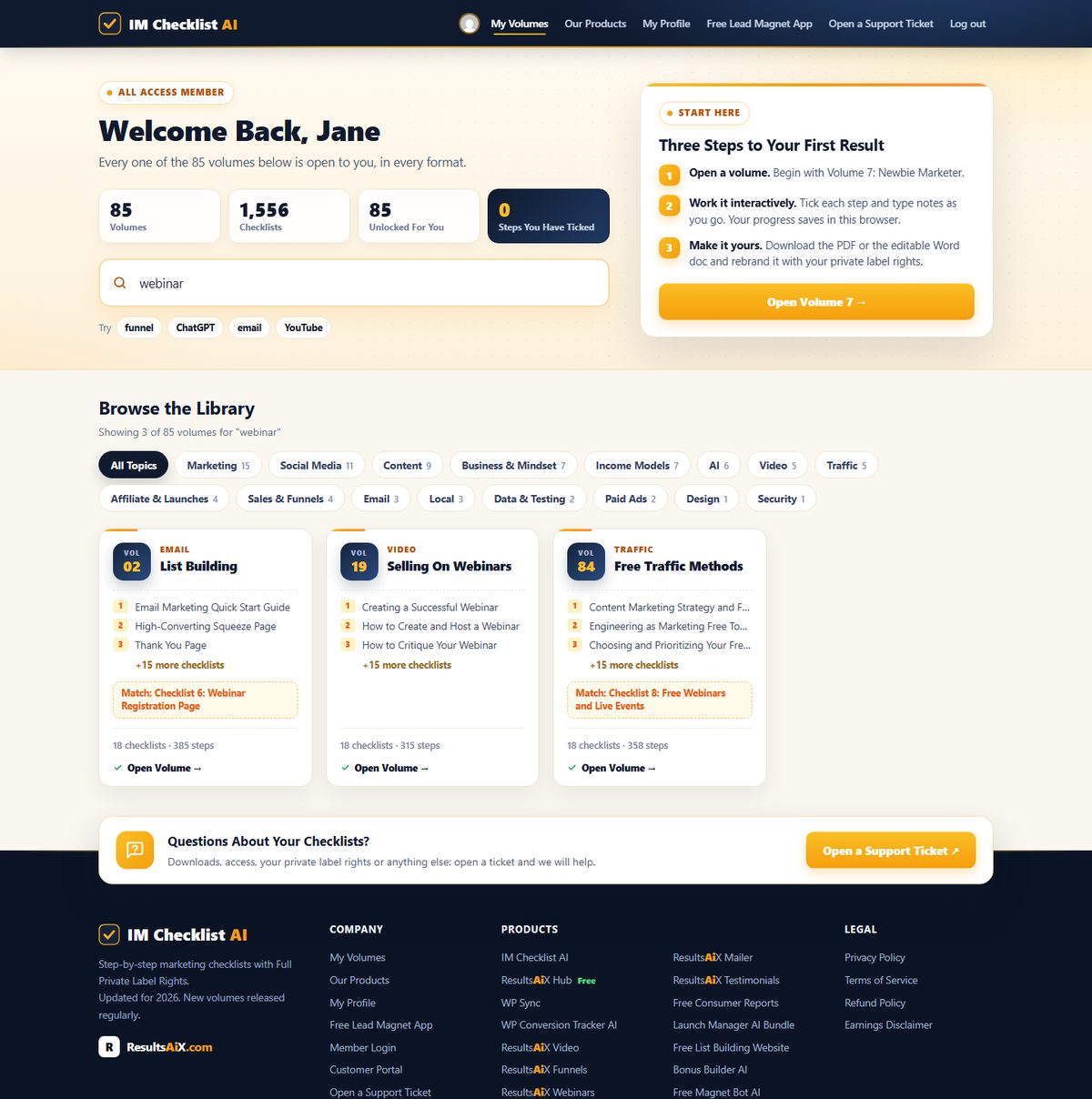
Find the right checklist in seconds. Type any task, tool or topic and every matching volume appears instantly, across all 1,576 checklists.

imchecklist.org/members
Searching the whole library for webinar

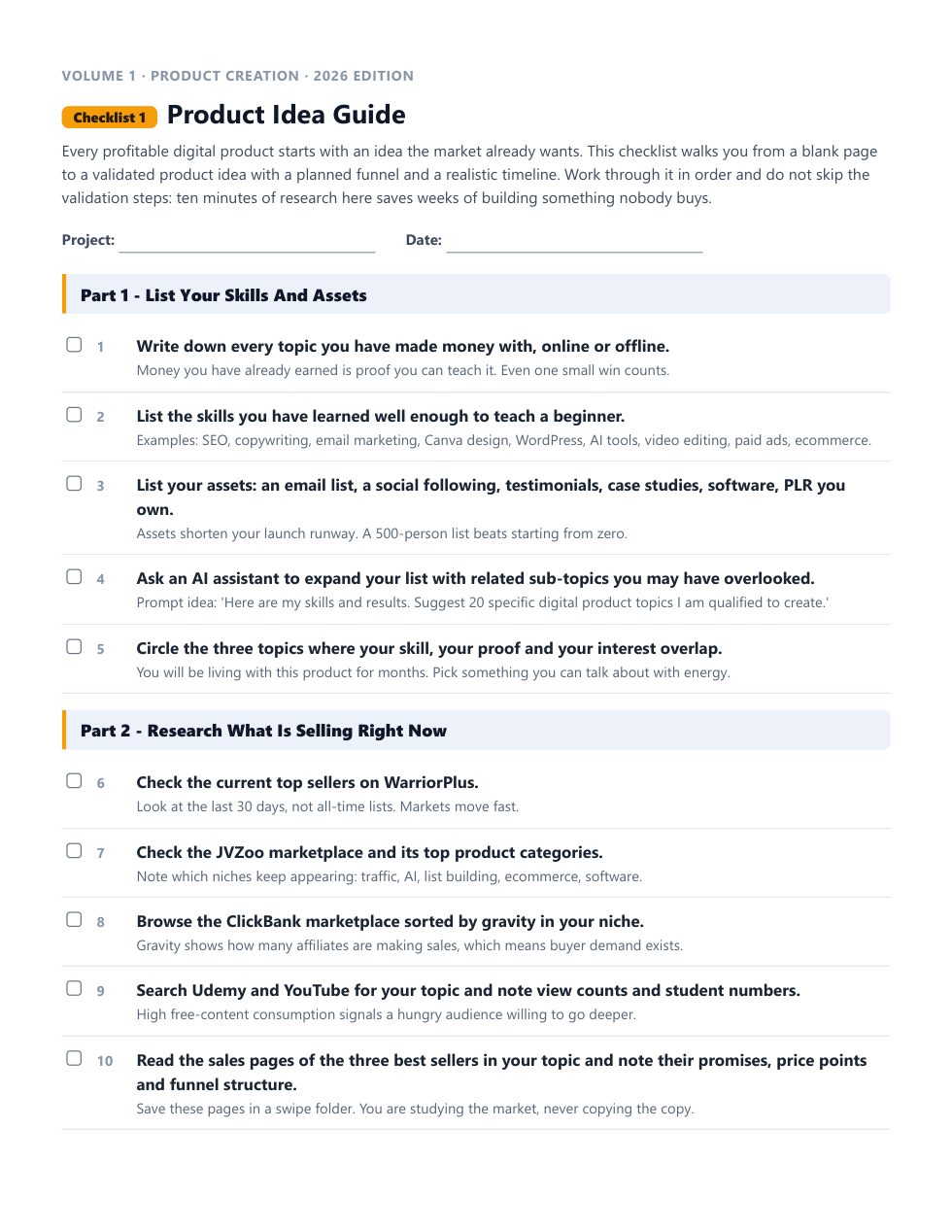
Print it, pin it, tick it. Every checklist comes as a clean printable PDF and an editable Word document you can rebrand.

Volume 1, Checklist 1 as a printable PDF

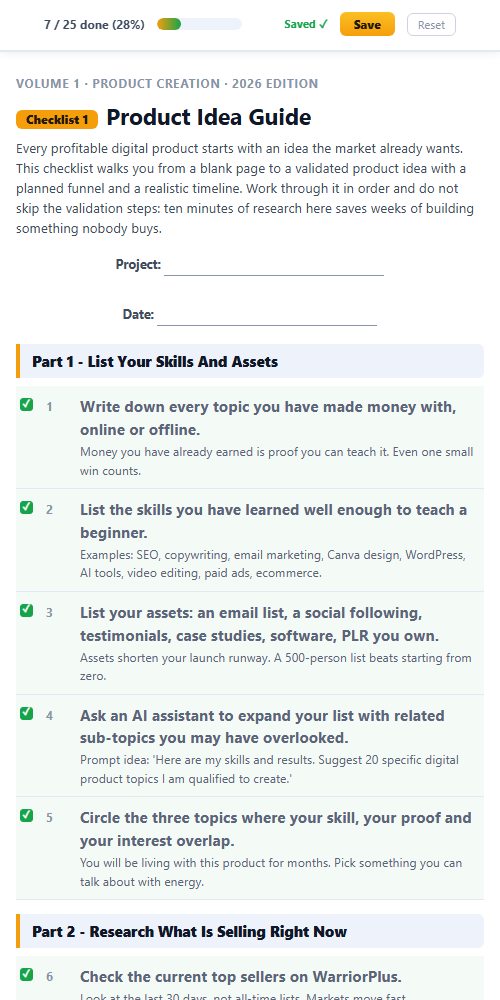
Works everywhere. The members area and every interactive checklist work on any phone, tablet or computer.

An interactive checklist on a phone

This isn't a collection of generic templates. It's a complete marketing operating system covering every task worth doing in your online business.

Product creation. List building. Paid ads. Social media. AI tools. YouTube. Affiliate marketing. Freelancing. PLR. Ecommerce. SEO. Copywriting. Funnels. Membership sites. All of it, step by step, ready to follow.

And it doesn't stop growing. A new volume lands every month, covering the latest strategies and tools, and it's already yours the day it drops.

And that’s just one volume

LinkedIn Marketing Is 1 Of 86 Volumes. Join Once, Get Them All.

Product creation, list building, affiliate marketing, YouTube, SEO, funnels, webinars, AI and much more. Every volume works the same way, with full private label rights. Search the library below, or hover any volume to see what’s inside.

86volumes
1,576checklists
1new volume every month
$3unlocks all of them

01Product Creation18 checklists · MarketingInside Volume 1
  • Product Idea Guide
  • Software And Services
  • Funnel Creation
+15 more · Look inside →
02List Building18 checklists · EmailInside Volume 2
  • Email Marketing Quick Start Guide
  • High-Converting Squeeze Page
  • Thank You Page
+15 more · Look inside →
03Social Media30 checklists · Social MediaInside Volume 3
  • Social Media Growth Hacks
  • Social Media Branding Checklist
  • Gmail And Google Account Setup
+27 more · Look inside →
04Affiliate Marketing19 checklists · Affiliate & LaunchesInside Volume 4
  • Choosing Your Affiliate Networks
  • Affiliate Metrics And Abbreviations
  • Finding A Profitable Niche
+16 more · Look inside →
05Video Marketing20 checklists · VideoInside Volume 5
  • Video Goals And Strategy
  • Video Types And Content Ideas
  • Video Keyword And Topic Research
+17 more · Look inside →
06Canva32 checklists · DesignInside Volume 6
  • Set Up Your Canva Account
  • Navigate The Canva Home And Workspace
  • Complete Your Profile And Brand Settings
+29 more · Look inside →
07Newbie Marketer18 checklists · MarketingInside Volume 7
  • Domain And Hosting Setup
  • Business Branding Setup
  • WordPress Setup
+15 more · Look inside →
08Messenger Marketing21 checklists · Social MediaInside Volume 8
  • Choosing Your Chat Platform And Connecting Your Channels
  • Creating Your Chat Marketing Plan
  • Core Settings For Your Chat Automation Account
+18 more · Look inside →
09Outsourcing18 checklists · Business & MindsetInside Volume 9
  • Outsourcing Needs Assessment
  • Choosing The Right Outsourcing Platform
  • How To Find The Right Person For Your Team
+15 more · Look inside →
10Self Publishing18 checklists · ContentInside Volume 10
  • Book Planning
  • Book Writing
  • Book Cover Design
+15 more · Look inside →
11Blogging18 checklists · ContentInside Volume 11
  • Plan Your WordPress Blog Before You Build
  • Installing WordPress From Scratch
  • Choosing, Installing And Configuring A WordPress Theme
+15 more · Look inside →
12Offline Business Startup18 checklists · LocalInside Volume 12
  • How To Promote Your Agency And Win Local Clients
  • How To Create A Simple Business Plan
  • How To Manage Your New Business Day To Day
+15 more · Look inside →
13Make Money Online & Crisis Management18 checklists · Income ModelsInside Volume 13
  • Make Money Online With Blogging
  • Make Money Online Selling Ebooks
  • Make Money Online Creating Videos
+15 more · Look inside →
14Search Engine Optimization19 checklists · TrafficInside Volume 14
  • 301 vs 302 Redirects: Which Is Best For SEO
  • How To Check Domain Authority And Page Authority
  • How To Do Keyword Research And Analysis
+16 more · Look inside →
15YouTube Advertising18 checklists · VideoInside Volume 15
  • Google Ads For Video: Basics And Getting Started
  • A How-To Guide On Promoting Your Video Ads With Google Ads
  • Best Practices For YouTube Ad Videos
+15 more · Look inside →
16Copywriting18 checklists · ContentInside Volume 16
  • Copywriting For Beginners: How To Get Started
  • Copywriting Hacks For Appealing Content
  • Copywriting Research: Finding What Actually Sells
+15 more · Look inside →
17ClickBank18 checklists · Affiliate & LaunchesInside Volume 17
  • ClickBank Account Setup And Ground Rules
  • Getting Your Affiliate Links And Tracking IDs
  • How To Get Paid With ClickBank
+15 more · Look inside →
18LinkedIn Marketing18 checklists · Social MediaInside Volume 18
  • Optimizing Your LinkedIn Profile
  • Running Your Business Through A LinkedIn Page
  • Building A Standout Student Or Early Career Profile
+15 more · Look inside →
19Selling On Webinars18 checklists · VideoInside Volume 19
  • Creating A Successful Webinar
  • How To Create And Host A Webinar
  • How To Critique Your Webinar
+15 more · Look inside →
20Profiting With PLR18 checklists · ContentInside Volume 20
  • PLR Project Clarity Checklist
  • Top PLR Profit Models
  • Building Your PLR Vendor Rolodex
+15 more · Look inside →
21Google Analytics18 checklists · Data & TestingInside Volume 21
  • GA4 Account Audit
  • GA4 Account And Property Installation
  • GA4 Tagging With The Google Tag
+15 more · Look inside →
22Mindset18 checklists · Business & MindsetInside Volume 22
  • The Entrepreneur Mindset
  • The Healthy Mindset
  • Mindset Of Confident People
+15 more · Look inside →
23Google Ads18 checklists · Paid AdsInside Volume 23
  • How To Set Up A Google Ads Account
  • How To Use Google Ads Keyword Planner
  • Dos And Don'ts Of Google Ads
+15 more · Look inside →
24Influencer Marketing18 checklists · Social MediaInside Volume 24
  • Getting Started With Influencer Marketing
  • Ways To Make Money As An Influencer
  • How To Become An Instagram Influencer
+15 more · Look inside →
25Membership Sites18 checklists · Income ModelsInside Volume 25
  • Finding A Niche That Works For You And Your Members
  • Testing Your Membership Idea With An MVP
  • Tracking And Analyzing Your Membership Metrics
+15 more · Look inside →
26Lead Sources18 checklists · MarketingInside Volume 26
  • Blog Lead Capture: Popups, Bars And In-Content Forms
  • Optimize Your Social Media Profiles For Lead Generation
  • SEO And Organic Search Lead Generation
+15 more · Look inside →
27Daily Tasks And Planning18 checklists · Business & MindsetInside Volume 27
  • Creating A Yearly, Monthly, Weekly And Daily Plan
  • Breaking Down Your Daily Plan
  • Outsourcing And Delegating Your Daily Tasks
+15 more · Look inside →
28Funnels18 checklists · Sales & FunnelsInside Volume 28
  • Market Research
  • Funnel Hacking
  • Developing Your Marketing Message
+15 more · Look inside →
29Ecommerce18 checklists · Sales & FunnelsInside Volume 29
  • Choosing Your Ecommerce Platform
  • Selling On Shopify
  • Selling On BigCommerce
+15 more · Look inside →
30Instagram Marketing18 checklists · Social MediaInside Volume 30
  • Instagram Profile Optimization And Call-To-Actions
  • Switching To A Professional Instagram Account
  • Branded Hashtag And Keyword Strategy
+15 more · Look inside →
31Local Marketing18 checklists · LocalInside Volume 31
  • Defining Your Local Market And Customer
  • Setting Your Local Marketing Goals And Budget
  • Building A Consistent Local Brand Identity
+15 more · Look inside →
32Facebook Ads18 checklists · Social MediaInside Volume 32
  • Setting Up Your Meta Ads Account
  • Finding Your Target Audience
  • Building Landing Pages For Meta Ads
+15 more · Look inside →
33Content Marketing18 checklists · ContentInside Volume 33
  • Finding Content Topics People Are Actually Searching For
  • Building A Content Marketing Strategy
  • Choosing Your Content Marketing Tool Stack
+15 more · Look inside →
34Online Traffic For Marketers18 checklists · TrafficInside Volume 34
  • Email As Your Owned Traffic Engine
  • Guest Blogging For Referral Traffic And Authority
  • On-Page SEO And AI Search Visibility
+15 more · Look inside →
35Review Sites18 checklists · MarketingInside Volume 35
  • Setting Up Your Review Site
  • Choosing A Review Site Theme
  • Keyword Research And On-Page Mapping
+15 more · Look inside →
36Podcasting18 checklists · MarketingInside Volume 36
  • Coming Up With Ideas And A Name For Your Podcast
  • Podcast Equipment Checklist
  • Select Your Podcast Format
+15 more · Look inside →
37Consulting18 checklists · Business & MindsetInside Volume 37
  • Conducting Market Research
  • Finding Your Niche And Ideal Clients
  • Defining The Services Of Your Firm
+15 more · Look inside →
38Securing Your Content18 checklists · ContentInside Volume 38
  • Choosing A Secure Host And Delivery Setup For Your Content
  • Locking Down Access Credentials And Admin Accounts
  • Backing Up Your Digital Product Library And Content Assets
+15 more · Look inside →
39Split Testing And Optimization18 checklists · Data & TestingInside Volume 39
  • Choosing A Testing And Analytics Tool
  • Auditing Your Website's Performance And Analytics
  • Identifying What To Test
+15 more · Look inside →
40List Engagement18 checklists · EmailInside Volume 40
  • Selecting Your Email Service Provider
  • Defining Your Email Marketing Goals And Objectives
  • Segmenting Your Email List
+15 more · Look inside →
41Kindle Publishing & Print On Demand18 checklists · ContentInside Volume 41
  • Setting Up Your KDP Account For Low Content Publishing
  • Planning Your Low Content Book
  • Creating Your Book Title And Subtitle
+15 more · Look inside →
42Digital Agency Startup18 checklists · Business & MindsetInside Volume 42
  • Identifying And Defining Your Niche
  • Choosing Your Agency Business And Pricing Model
  • Writing Your Agency Business Plan
+15 more · Look inside →
43Tripwire Offers18 checklists · Sales & FunnelsInside Volume 43
  • Selecting Your Tripwire Offer
  • Creating A Minimum Viable Tripwire Version
  • Building Your Tripwire Strategy
+15 more · Look inside →
44Bing Ads18 checklists · Paid AdsInside Volume 44
  • Setting Up A Microsoft Advertising Account
  • Selecting Best Keywords For Your Campaign
  • Creating Your Microsoft Advertising Campaign
+15 more · Look inside →
45Improving Email Delivery18 checklists · EmailInside Volume 45
  • Choosing An Email Service Provider
  • Testing Email Deliverability
  • Email Authentication, Bulk Sender Compliance And Domain Warm-Up
+15 more · Look inside →
46Google My Business18 checklists · LocalInside Volume 46
  • Setting Up A Google Business Profile Listing
  • Optimizing Your Business Profile For Google Search And Maps
  • Creating Posts For Your Google Business Profile
+15 more · Look inside →
47Cyber Security18 checklists · SecurityInside Volume 47
  • Performing Periodic Security Assessments
  • Choosing And Using A Password Manager With Two-Factor Authentication
  • Backing Up Your Business Data
+15 more · Look inside →
48Niche Websites18 checklists · Income ModelsInside Volume 48
  • Niche Selection And Validation
  • Topical Research For Topical Authority
  • Setting Up Your Niche Site
+15 more · Look inside →
49Domain Flipping18 checklists · Income ModelsInside Volume 49
  • Finding And Selecting A Domain Name To Flip
  • Evaluating And Valuing Your Domain Name
  • Analyzing Trends To Identify Domain Opportunities
+15 more · Look inside →
50Pinterest Ads18 checklists · Social MediaInside Volume 50
  • Setting Up Your Pinterest Business Account
  • Selecting Your Target Audience And Actalike Audience
  • Selecting Your Pinterest Pin
+15 more · Look inside →
51Using Cryptocurrencies In Your Business18 checklists · Income ModelsInside Volume 51
  • Choosing Which Cryptocurrencies To Accept In Your Business
  • Building Your Cryptocurrency Adoption Roadmap
  • Acquiring Cryptocurrency For Your Business
+15 more · Look inside →
52Financial Management For Small Business Owners18 checklists · MarketingInside Volume 52
  • Cash Flow Projection And Management
  • Creating A Business Budget
  • Setting Up The Right Business Insurance
+15 more · Look inside →
53TikTok Marketing18 checklists · Social MediaInside Volume 53
  • Setting Up Your TikTok Business Account And Ads Manager
  • Defining Your Target Audience And Campaign Objectives
  • Creating A TikTok Content Strategy
+15 more · Look inside →
5418 Free Traffic Generation Strategies18 checklists · TrafficInside Volume 54
  • Facebook Groups And Pages
  • Facebook Personal Profile
  • YouTube Videos And Shorts
+15 more · Look inside →
55Metaverse18 checklists · MarketingInside Volume 55
  • Choosing Where Immersive Marketing Actually Makes Sense
  • Building Your Brand With AR, VR and Virtual Experiences
  • Creating AR and VR Video Content For Your Business
+15 more · Look inside →
56Online Gaming17 checklists · MarketingInside Volume 56
  • Becoming a Professional Gamer
  • Evaluating Games and Platforms Worth Building a Channel Around
  • Investing in the Right Gaming and Streaming Equipment
+14 more · Look inside →
57Cutting Operational Costs And Expenses18 checklists · MarketingInside Volume 57
  • Analyzing Your Business Financial Health
  • Lowering Business Financial Expenditures
  • Building A Lean, Workable Budget
+15 more · Look inside →
58Customer Service & Retention15 checklists · MarketingInside Volume 58
  • Leveraging Customer Data
  • Building Customer Loyalty And Long-Term Relationships
  • Developing And Implementing Frequent Buyer Programs
+12 more · Look inside →
59Seasonal Marketing18 checklists · MarketingInside Volume 59
  • Creating A Holiday Marketing Plan
  • Adopting A Robust Social Media Marketing Strategy
  • Optimizing Your Website For Mobile E-Commerce Sales
+15 more · Look inside →
60Starting An Online Business18 checklists · MarketingInside Volume 60
  • Choosing Your Niche And Business Model
  • Business Concept And Value Proposition
  • Business Structure And Registration Basics
+15 more · Look inside →
61Affiliate Marketing 2.018 checklists · Affiliate & LaunchesInside Volume 61
  • Advanced Niche Selection And Portfolio Strategy
  • Affiliate Networks Beyond The Basics
  • Getting Approved Into Premium And Invite-Only Programs
+15 more · Look inside →
62Marketing On Facebook18 checklists · Social MediaInside Volume 62
  • Setting Up Your Facebook Business Page
  • Building And Growing A Facebook Group For Your Business
  • Optimizing Your Facebook Page For Conversions And Selling
+15 more · Look inside →
63Instagram Reels18 checklists · Social MediaInside Volume 63
  • Choosing A Niche For Your Instagram Reels
  • Brainstorming Instagram Reel Ideas
  • Producing And Editing Instagram Reels For Your Business
+15 more · Look inside →
64ChatGPT18 checklists · AIInside Volume 64
  • ChatGPT Account Setup And First Prompts
  • Writing Ad Copy With ChatGPT
  • Using ChatGPT For Research And Content Curation
+15 more · Look inside →
65The Healthy Marketer18 checklists · Business & MindsetInside Volume 65
  • Building A Daily Routine That Actually Sticks
  • Optimizing Your Home Office Setup For Posture And Comfort
  • Planning Healthy Meals And Hydration For Long Work Days
+15 more · Look inside →
66Becoming A Freelancer18 checklists · Business & MindsetInside Volume 66
  • Choosing Your Freelance Niche And Service
  • Building A Freelancer Profile That Converts
  • Naming And Registering Your Freelance Business
+15 more · Look inside →
67Using AI For Internet Marketing18 checklists · AIInside Volume 67
  • Defining Your Marketing Goals
  • Using AI To Identify Your Target Audience
  • Selecting The Right AI Tools For Your Marketing
+15 more · Look inside →
68Using AI For Images And Videos14 checklists · AIInside Volume 68
  • AI Image Generation Fundamentals And Prompting
  • Using AI To Edit And Enhance Images
  • Using AI-Generated Images And Video To Boost Engagement
+11 more · Look inside →
69Generating Passive Income15 checklists · Income ModelsInside Volume 69
  • Passive Income Reality Check
  • Choosing Your Passive Income Model
  • Building A Build-Once Digital Product
+12 more · Look inside →
70The Ultimate Warrior Plus Checklists18 checklists · Affiliate & LaunchesInside Volume 70
  • The WarriorPlus Menu System Explained
  • Connecting Payment Processors And Understanding Fees
  • Setting Up Your WarriorPlus Profile
+15 more · Look inside →
71YouTube Channel Growth And Strategies20 checklists · VideoInside Volume 71
  • Defining Your YouTube Channel Niche
  • Crafting An Engaging Channel Trailer
  • Optimizing Channel Art And Branding
+17 more · Look inside →
72Traffic Generation With Pinterest18 checklists · Social MediaInside Volume 72
  • Create A Pinterest Business Account
  • Optimizing Your Pinterest Business Profile
  • Designing Captivating Pinterest Boards
+15 more · Look inside →
73Membership Site Ideas & Growth Strategies18 checklists · Income ModelsInside Volume 73
  • Defining Your Membership Site Niche
  • Content Strategy For Long-Term Member Retention
  • Choosing A Membership Model That Fits Your Growth Strategy
+15 more · Look inside →
74Rebranding PLR For Profits18 checklists · ContentInside Volume 74
  • Understanding PLR
  • Niche And Audience Fit Check
  • PLR Intake And Content Audit
+15 more · Look inside →
75Selling On Etsy18 checklists · Sales & FunnelsInside Volume 75
  • Setting Up Your Etsy Shop
  • Listing Your Products
  • Managing Orders And Customer Service
+15 more · Look inside →
76Building A Website From Start To Finish18 checklists · MarketingInside Volume 76
  • Define Your Website Goals And Objectives
  • Choose A Domain Name
  • Choose Your Website Platform And Hosting
+15 more · Look inside →
77The Art Of Storytelling In Marketing18 checklists · ContentInside Volume 77
  • Understand The Power Of Storytelling In Marketing
  • Identify Your Brand And Founder Story
  • Map Your Audience's Story World
+15 more · Look inside →
78FOMO Marketing18 checklists · MarketingInside Volume 78
  • Understanding FOMO Dynamics
  • Identifying FOMO Triggers
  • Creating Scarcity And Urgency
+15 more · Look inside →
79AI Generated Content18 checklists · AIInside Volume 79
  • Introduction To AI Generated Content
  • Types Of AI Generated Written Content
  • Benefits Of AI Assisted Content Production
+15 more · Look inside →
80Understanding Paid Traffic18 checklists · TrafficInside Volume 80
  • Setting Paid Traffic Goals And Objectives
  • Choosing The Right Paid Traffic Platform
  • Setting Your Starter Budget And Loss Tolerance
+15 more · Look inside →
81AI Powered Chatbots18 checklists · AIInside Volume 81
  • Defining Chatbot Objectives And Goals
  • Selecting The Right Chatbot Platform
  • Designing Conversational Flows
+15 more · Look inside →
82YouTube Channel Monetization18 checklists · VideoInside Volume 82
  • YouTube Partner Program Eligibility And Application
  • Super Chat, Super Thanks And Super Stickers
  • Fan Funding Platforms As A Revenue Complement
+15 more · Look inside →
83Multi-Channel Marketing18 checklists · MarketingInside Volume 83
  • Defining Multi-Channel Marketing Objectives
  • Identifying Target Audiences Across Channels
  • Choosing The Right Marketing Channels
+15 more · Look inside →
84Free Traffic Methods18 checklists · TrafficInside Volume 84
  • Content Marketing Strategy And Free Traffic Planning
  • Engineering As Marketing: Free Tools And Calculators
  • Choosing And Prioritizing Your Free Traffic Channels
+15 more · Look inside →
85AI Agents20 checklists · AIInside Volume 85
  • What an AI Agent Is, and When You Actually Need One
  • Choosing Your First Agent Job
  • Picking an Agent Platform (No-Code or Code)
+17 more · Look inside →
86Using AI For Free Traffic Generation20 checklists · AIInside Volume 86
  • Your Free Traffic Plan: Pick Two Channels
  • AI Keyword and Topic Research With Free Tools
  • Blog Posts That Rank in 2026 (With AI as Your Assistant)
+17 more · Look inside →

Nothing matches that search. Try a broader word, like "traffic" or "social".

All 86 volumes. All 1,576 checklists. All yours today.

Full Private Label Rights Included

Put Your Name On It. Sell It. Keep Every Dollar.

Every checklist comes as an editable Word document with full private label rights. Rebrand it, sell it as your own product, give it away, or use it with clients. With the membership that is not just the 18 LinkedIn Marketing checklists. It is all 1,576 checklists in all 86 volumes.

1,576checklists you can resell
100%of every sale is yours
0royalties, splits or credits
A real checklist page, ready to rebrand
Your brand here

Rebrand Any Checklist In About 10 Minutes

1

Open the Word doc

Every checklist downloads as a real, editable Word document. No locked PDFs, no special software.

2

Add your name and logo

Change the title, add your branding, add or remove steps. As far as your customers are concerned, you wrote it.

3

Sell it, give it, use it

Sell it on your own site or a marketplace, use it as a lead magnet, or hand it to a client. Every dollar is yours.

What You Can Actually Do With These

Most products end where the download finishes. This one starts there. You don't just get to use these checklists. You get to own them.

💰

Resell Them

List them as your own product tomorrow. Every dollar is yours. No split. No royalty. 100% profit.

🏷️

Rebrand Them

Your name. Your logo. Your brand. Nobody sees "IM Checklist" anywhere unless you want them to.

✍️

Claim Full Ownership

You wrote these, as far as your customers are concerned. Put your name on the cover and publish them under your own business.

🎁

Give Them Away

Need a lead magnet? This is the fastest one you'll ever "write". Trade it for an email address and start building your list today.

✏️

Edit Everything

Every checklist is a real Word doc. Open it. Change it. Add your own steps or remove the ones you don't need.

📦

Repurpose Freely

One checklist becomes a blog post, an email series, a video script, a client deliverable or a content calendar.

12 Smart Ways To Learn And Profit From These Checklists

1
Rebrand and sell them over and overList them on WarriorPlus, JVZoo, Gumroad or your own site.
2
Turn them into video productsScreen record yourself going through each checklist and sell it as a course.
3
Use them as upsells in your funnel"Want the checklist version? Add it for $7."
4
Turn them into high-quality blog postsOne checklist is one complete how-to article.
5
Use them as bonuses for promotionsStand out as an affiliate with exclusive checklists.
6
Add them to your membership siteInstant content that delivers real value.
7
Build your email list with them"Get the free checklist" turns visitors into subscribers.
8
Increase the value of your productsBundle checklists with what you already sell.
9
Turn them into webinar presentationsWalk through a checklist live and pitch your offer at the end.
10
Use them in your coaching programGive clients a clear roadmap to follow between calls.
11
Translate them into other languagesTap into non-English markets with the same content.
12
Educate yourself and profitFollow them yourself, get results, then teach others.

Do anything you want with these. Sell them and keep every dollar. Slap your logo on them. Edit them, translate them, bundle them, give them away, build a course out of them, hand them to a client and bill for it. Nobody is checking. The Word versions make any of it a ten-minute job.

💰

Full PLR Means This Pays For Itself

Rebrand one checklist and sell it once for $17, and your first month is paid. Sell a bundle of 18 checklists for $47 or $97, or use them to land a client, and the whole year is covered with room to spare.

Your Private Label Rights, In Black And White

  • YES Edit, add graphics and rebrand any way you wish
  • YES Claim full authorship and put your name on them
  • YES Resell them and keep 100 percent of the profits
  • YES Give them away to build your email list
  • YES Turn them into PowerPoint or webinar presentations
  • YES Create video training courses from them
  • YES Add them to paid membership sites
  • YES Use them as blog posts, emails or infographics
  • YES Translate them into other languages
  • YES Bundle them into your own offers and bonuses
  • YES Use them with clients and in coaching programs

Here's What Others Are Already Saying

★★★★★

“IM Checklists allow you to get on with making money without the worry, fear and weight on your shoulders that you may have forgotten something. EVERYTHING is there in a clear and easy to consume format that can be checked off in seconds. A must have for all serious marketers.”

Carl Picot
★★★★★

“These checklists have been a great asset in helping me set up my first launch, ensuring that I didn't miss any steps under tight time constraints. I highly recommend these checklists.”

Dominic Anderton
★★★★★

“As a customer, just wanted to say thanks for creating IM Checklist. It's all in the worry of what I may forget. You have removed that fear. Many thanks.”

Mike Holthuysen
★★★★★

“The ability for someone to follow a proven method step by step like this is tantamount to their success with marketing.”

Reed Floren
Get started

Choose How You Want It

Own Volume 18 on its own, or open every volume in the library.

Just this volume

Volume 18

$27

one payment

  • All 18 LinkedIn Marketing checklists
  • Interactive, PDF and editable Word
  • Full private label rights
  • The LinkedIn Pipeline Profit Kit
  • Instant access, no subscription
Get Volume 18 →
Every volume

Membership

$3

for 7 days, then $17.95 a month

  • Volume 18 plus all 85 other volumes
  • 1,576 checklists, all with full private label rights
  • Every volume's Profit Kit
  • A new volume every month
  • Cancel anytime
Start Your $3 Trial →
Best value

Lifetime

$197

one payment, every volume for good

  • Every volume today and every new one
  • 1,576 checklists with full private label rights
  • Every volume's Profit Kit
  • No renewals, ever
Get Lifetime Access →

🔒 Secure checkout · Instant access · 14-day money-back guarantee

14DAYS
100% Risk-Free

Try It For 14 Days

Work through the checklists and use them in your business. If they are not worth far more than you paid, open a support ticket within 14 days and every cent comes back. No form, no questions.

Questions, Answered

What do I get when I join?

Every volume in IM Checklist AI, 86 of them with 1,576 checklists, including all 18 LinkedIn Marketing checklists. Each one comes as an interactive checklist that saves your progress, a printable PDF and an editable Word document, and a new volume is added every month.

How does the $3 trial work?

You pay $3 today and get every volume for 7 days. After that it is $17.95 a month. Cancel anytime, including during the trial.

Can I buy Volume 18 on its own?

Yes. Volume 18 on its own is $27, one time: all 18 checklists with full private label rights, plus the LinkedIn Pipeline Profit Kit. Or start the $3 trial and get this volume together with every other one.

What is in the Profit Kit?

A squeeze page and download page that give away Checklists 1 and 2, a complete sales page for the whole volume, 5 follow-up emails, a 3D cover, a flat cover and a free gift cover, four legal page templates and a Quick Start guide with a 7-day plan. Every page, email and cover is unbranded and ready for your name.

Do I need experience?

No. Every checklist starts with a short brief, then tells you exactly what to do and in what order, with a practical tip under every step.

Are the checklists up to date?

Yes. The whole library has been rewritten for 2026, and new volumes are added every month.

Can I resell the checklists?

Yes. Full private label rights cover every checklist in every volume: edit them, rebrand them, claim authorship, resell them and keep 100%, give them away, or use them with clients.

I am already an IM Checklist AI Gold or Lifetime member.

Then every volume, including this one, is already in your members area at no extra cost. Log in and it is waiting for you.

What is the difference between the three options?

Volume 18 on its own is $27 once: its 18 checklists with full private label rights and the LinkedIn Pipeline Profit Kit. The membership is $3 for 7 days, then $17.95 a month, and opens every volume with every Profit Kit. Lifetime is $197 once for every volume, including every new one, with no renewals.

Can I start with one volume and upgrade later?

Yes. Everything you buy sits in the same members area, so you can add the membership or lifetime whenever you like.

I am on the monthly plan. Can I switch to lifetime?

Yes. Buy lifetime, then cancel your monthly subscription in Manage My Subscription, or open a support ticket and we will cancel it for you.

How do I get access after joining?

Instantly. Your login arrives by email with a one-click button, and every volume is waiting in the members area.

Start LinkedIn Marketing Today

18 step-by-step checklists with full private label rights and the LinkedIn Pipeline Profit Kit. Own Volume 18 on its own, or open all 86 volumes.